Cubik's - Solver, Simulator
Manoj Bhatt
Screenshots
About this app
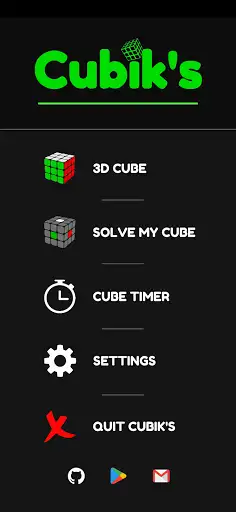
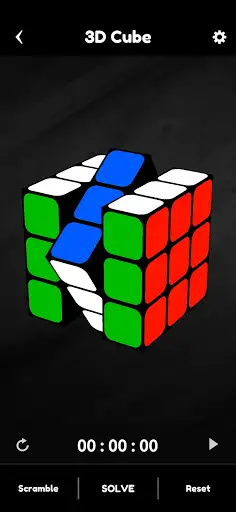
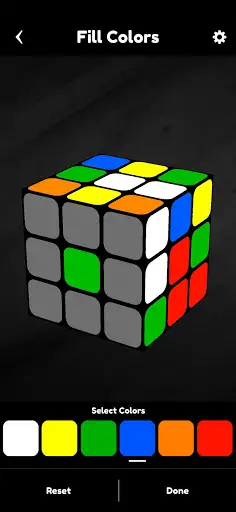
Cubik's hands you a clean 3D model of a scrambled puzzle and says: go. You can rotate the view with a swipe, fill in your real-world colors if you want the app to solve your exact cube, pick a solving style, and then watch a step-by-step replay while the on-screen timer counts your attempt. It’s free and open-source, no fluff. Basic flow: set colors or scramble, choose method, hit solve, follow the moves, time yourself. Short note: this is not aimed only at speed demons. Beginners who hate memorizing notation will like the visual playbacks. Advanced players will like the fast solver for checking scrambles or testing recognition drills. "Wait—so it shows the moves one by one?" I asked aloud while my roommate rolled her eyes. "Yep," it answered (well, not literally), and the cube on screen marched through each twist in plain language and clear animation. The app ships with two solving approaches: a compact, advanced search method that usually produces short solutions, and a layered, CFOP-style walkthrough that mimics how most humans learn to solve step-by-step. The timer gives you official-style scrambles and stores your times, so you can practice or track progress. There’s also a color-input mode: if your physical cube is scrambled but not recorded, just tap the stickers on the model to match and the app solves that exact state. Pause. If you want flash tutorials, video cues, or an algorithm trainer, this isn’t a full coaching suite. It’s a fast, honest toolbox—solve, watch, time, repeat. The interface is straightforward but not fancy. If you like poking through settings and tweaking every tiny animation, you might want more. If you want a reliable digital partner that gets the scramble right and moves faster than you can blink, this is it. Target audience: casual solvers who want instant help, practice-timers who need clean scrambles, and tinkerers who enjoy an open code base. If you’ve ever cursed at a stubborn F2L pair and wanted the app to show you what you missed, this will feel like relief.
Editor's Review
I downloaded Cubik's late one night because I wanted a quick way to check a nasty scramble I’d gotten at a meet. First impressions: it loads fast, and the 3D model is sharp enough to make you stop squinting. I fed it my colors, hit solve, and watched the app unwind the mess in under a second. My brain: holy — that was slick. My hands: jealous. I’m not kidding when I say I got stuck on an F2L pair for two hours last week; this app helped me see the right insertion (and yes, my hands were sweating). The faster solving method usually gives a compact move list—short and efficient. The CFOP-style playback is longer and more human-friendly, but don’t expect it to teach you algorithms; it shows what to do, not why. There are a few things that annoyed me. The UI can feel a touch spartan (no fancy coaching overlays). Playback controls could use more granularity—sometimes the replay feels a smidge too quick for me to mimic on a real cube. Also, the CFOP breakdown is helpful but might overwhelm absolute newbies who don’t know OLL/PLL names. Dialogue moment: "How did it do that?" I asked my roommate, pointing at the screen. "Magic algorithms," she said. (Fine, it’s Kociemba-style math—still feels like magic at 2 AM.) Bottom line: I use this as my quick-solve checker and timer. It’s not a full-on teaching platform, and it doesn’t baby you through every algorithm, but it does honest, fast work. If you want a reliable, no-nonsense app to solve scrambles, demo solutions in 3D, and time attempts, Cubik's is a solid pick. If you need step-by-step lessons with drills and progressions, you’ll want to pair it with a tutorial app or videos.
Pros
- Instant solves for any scrambled state—very fast playback.
- Two solve-styles: concise automated solutions and a human-style layered walkthrough.
- Built-in timer with official-style scrambles for practice sessions.
- Color-input mode lets you solve the exact state of your physical puzzle.
- Free and open-source—no paywall for core features.
Cons
- Playback speed control is limited; sometimes moves feel too quick to mimic.
- Not a full tutorial system—no guided algorithm drills or video lessons.
- Interface is functional but could use clearer labeling for advanced options.
- CFOP-style solutions are long and may confuse absolute beginners.
Additional Information
You May Also Like